By the end of a long day at the screen, your eyes feel dry, your vision is a little blurry, and a dull headache is building behind your forehead. You are not imagining it. Eye strain from screens is extremely common, and it affects students, office workers, and anyone who spends hours on a phone. The good news is that small changes make a real difference.
What Is Digital Eye Strain?
Digital eye strain, sometimes called computer vision syndrome, is a group of symptoms that appear after long periods of close-up screen use. It is usually temporary and does not cause lasting damage to the eyes, but it can reduce comfort and productivity.
Common symptoms include:
- Tired, burning, or itchy eyes
- Dry or watery eyes
- Blurred or double vision
- Headaches, especially around the temples or forehead
- Sensitivity to light
- Neck, shoulder, or back discomfort from awkward posture
Why Screens Tire Your Eyes
Several habits combine to cause the problem.
- Reduced blinking. People blink much less when they focus on a screen. Blinking spreads tears over the eye surface, so fewer blinks lead to dryness and irritation.
- Constant close focusing. Holding your gaze on something near keeps the focusing muscles inside the eye working without a break.
- Glare and poor lighting. Bright windows, overhead lights reflecting off the screen, or a screen much brighter than the room force your eyes to work harder.
- Screen distance and angle. A screen that is too close, too high, or too low makes you strain your eyes and neck.
- Uncorrected vision. Even a small prescription problem can become noticeable after hours of reading text on a screen.
Habit 1: Follow the 20-20-20 Rule
Every 20 minutes, look at something about 20 feet (around 6 meters) away for at least 20 seconds. This gives your focusing muscles a short rest. Use a phone timer or a simple reminder app until it becomes automatic. Looking out of a window, across the room, or at a distant object all work. Ideally, stand up and move for a minute as well.
Habit 2: Blink More, and Blink Fully
When you concentrate, you may blink only half as often as normal, and many of those blinks are incomplete. Make a point of blinking fully and slowly now and then. A simple practice is to close your eyes gently for two seconds every few minutes. If your eyes feel dry, preservative-free lubricating eye drops can help, but ask a pharmacist or eye doctor if you need them often.
Habit 3: Set Up Your Screen Properly
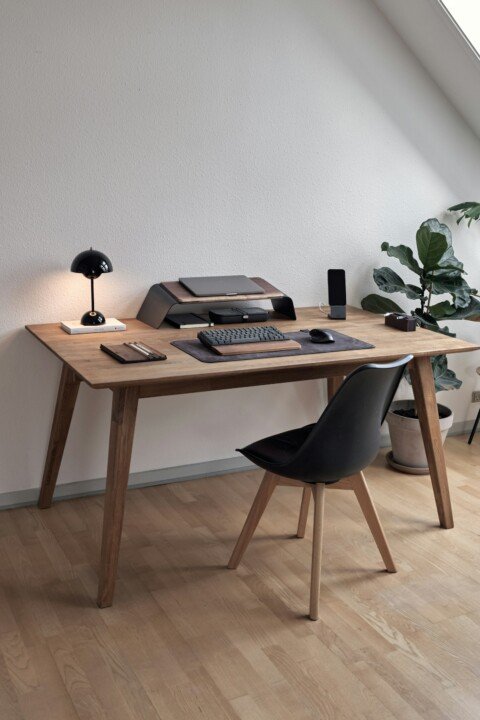
- Distance: place the screen about an arm’s length away (roughly 50 to 70 cm) for a computer, and hold your phone slightly farther than you would a book.
- Height: the top of the monitor should be at or just below eye level, so that you look slightly downward. This also exposes less eye surface to the air.
- Angle: tilt the screen slightly back to reduce reflections.
- Text size: increase font size and zoom so that you are not squinting.
- Contrast: use clear, dark text on a light background, and avoid very low-contrast color combinations.
Habit 4: Control the Lighting
The room and the screen should be similarly bright. Working in a dark room with a bright screen strains your eyes, and so does sitting with a bright window right behind or directly in front of the monitor.
- Place your screen at a right angle to windows when possible.
- Use curtains or blinds to cut glare from the sun.
- Choose soft, even lighting and avoid bright bulbs shining directly on the screen.
- Adjust screen brightness to match the room, and lower it in the evening.
- Consider a matte screen filter if reflections are a persistent problem.
Habit 5: Take Real Breaks
Besides the 20-20-20 pauses, take a longer break of ten to fifteen minutes after every one to two hours of continuous screen work. Walk, stretch, drink water, or step outside. Time outdoors is especially valuable. Research suggests that daylight and distance viewing are good for eye comfort and, in children, may help lower the risk of developing short-sightedness.
Habit 6: Look After Your Phone Habits
Phones are used closer to the face and for longer than many people realize. Avoid scrolling in the dark, because the contrast between the bright screen and the dark room tires your eyes and disturbs sleep. Hold your phone at a comfortable distance and at chest or eye level instead of bending your neck. Use the larger text options, and take screen-free breaks, especially at meals and before bed.
Habit 7: Protect Your Sleep
Using bright screens late at night can make it harder to fall asleep. Reduce brightness in the evening, use a night mode if it helps you, and stop screens at least 30 to 60 minutes before bedtime if possible. Good sleep also helps your eyes recover from the day.
Habit 8: Keep Your Eyes Healthy in General
- Drink enough water throughout the day.
- Eat a varied diet with vegetables, fruit, fish, eggs, and nuts, which supply nutrients that support eye health.
- Wear sunglasses with UV protection outdoors.
- Avoid rubbing your eyes, and wash your hands before touching them.
- Keep room air from being too dry, for example by not pointing fans or vents directly at your face.
- Do not smoke. It is linked with several serious eye conditions.
Get Regular Eye Exams
If your eyes often feel tired despite good habits, you may need glasses or an updated prescription. Many adults benefit from an eye exam every one to two years, and sooner if symptoms appear. Ask the eye care professional about lenses designed for computer work if you spend most of the day at a screen. People who wear contact lenses may notice more dryness and should take extra breaks and follow hygiene guidance.
When to See a Doctor Quickly
Seek prompt medical attention if you experience sudden vision loss, flashes of light, new floaters, eye pain, a curtain or shadow over your vision, or double vision that does not clear. These are not typical signs of simple eye strain and need urgent assessment.
Frequently Asked Questions
Do screens permanently damage your eyes?
Current evidence suggests that screen use causes temporary discomfort but does not permanently damage the eyes in adults. Still, heavy near-work in childhood is linked with short-sightedness, so outdoor time matters for children.
Do blue light glasses work?
Studies have not shown a clear benefit for reducing eye strain. Good habits, proper lighting, and correct prescriptions are more reliable. If you like them, they do no harm, but they are not a substitute for breaks.
Is dark mode better for my eyes?
It depends on the person. Dark mode can feel more comfortable in dim rooms, while many people read text more easily on a light background in bright rooms. Choose what feels comfortable.
How can I reduce eye strain for my child?
Set limits on screen time, encourage regular breaks, make sure they play outside daily, and arrange regular eye tests.
The Takeaway
Your eyes are built for looking at the world, not only at a screen a few centimeters away. Follow the 20-20-20 rule, blink often, fix your lighting and screen position, and take real breaks. If discomfort persists, see an eye care professional. Pick one change to try tomorrow, such as a reminder to look away every 20 minutes.
This article is general information, not medical advice. For persistent or sudden eye symptoms, consult a qualified eye care professional.